

At MRLUCKY88, we provide several payment methods for Malaysian members, including PayEssence, MyPay88 FPX & E-Wallet, and Telco Reload PIN. Our minimum deposit starts from RM1, while withdrawals start from RM25. Individual payment gateways may have different minimum deposit requirements.
Whether you’re making your first deposit or withdrawing your available balance, this guide explains our supported payment methods, transaction steps, payment limits and important account conditions.
MRLUCKY88 Payment Methods Available in Malaysia
We support different payment options to make depositing and withdrawing through your MRLUCKY88 account straightforward. Our deposit channels include online banking, e-wallet payments and prepaid reload PINs.
Each method follows its own payment instructions and may have different transaction requirements.
| Payment Method | Transaction Type | Important Details |
|---|---|---|
| PayEssence | Deposit | Supported banking and card-related payment options |
| MyPay88 FPX | Deposit | Online banking through available banks |
| MyPay88 E-Wallet | Deposit | Supported e-wallet transactions |
| Telco Reload PIN | Deposit | Requires a valid 16-digit reload PIN |
| Bank Withdrawal | Withdrawal | Minimum withdrawal RM25 |
Our general minimum deposit starts from RM1. However, some payment gateways require higher amounts.
For example, MyPay88 has a minimum deposit of RM2, while Maybank transactions through this gateway require at least RM30.
Before completing a payment, check the amount and available options displayed on your deposit screen.
How to Deposit at MRLUCKY88
Making a deposit starts from your MRLUCKY88 account dashboard. After logging in, select Deposit and choose one of our available payment methods.
Below are the steps for our three main deposit channels.
1. MRLUCKY88 Deposit via PayEssence
PayEssence is one of our available deposit gateways, supporting the banking and card-related options shown on the payment screen.
To deposit through PayEssence:
- Log in to your MRLUCKY88 account and select Deposit.
- Choose PayEssence & Credit Card from the payment options.
- Enter your preferred deposit amount.
- Select an available bank or payment option and complete the required authentication.
- Follow the on-screen instructions to confirm your payment.
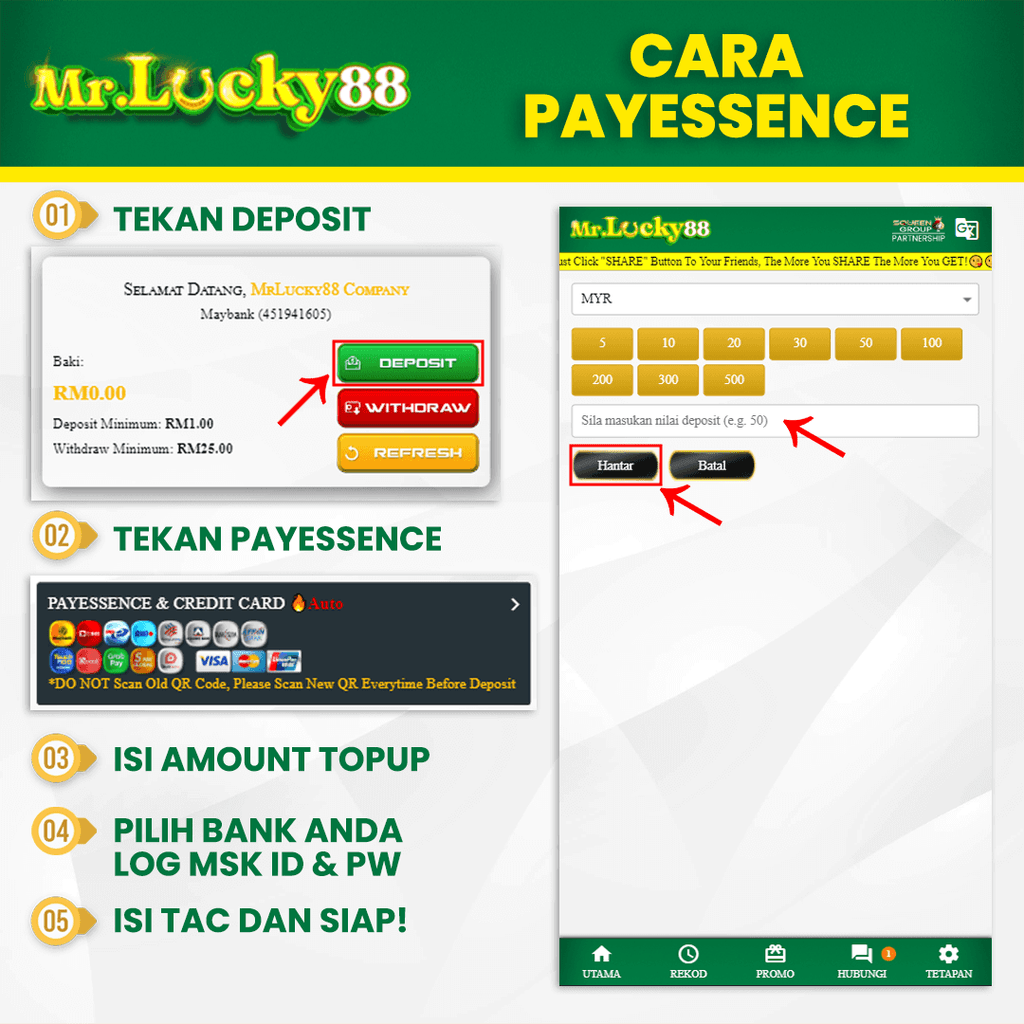
Important: Please use a newly generated QR code for each applicable deposit. Do not reuse a QR code from an earlier transaction.
Once your payment is completed, return to your account to check the deposit status.
2. Deposit via MyPay88 FPX & E-Wallet
Our MyPay88 Autopay FPX & E-Wallet option allows you to deposit using supported online banking and e-wallet channels.
This method is suitable when you prefer completing your payment through an available bank or e-wallet provider.
Follow these steps:
- Log in to your account and click Deposit.
- Select MyPay88 Autopay FPX & E-Wallet.
- Enter the amount you want to deposit.
- Choose your preferred available bank or e-wallet.
- Complete the payment verification and confirm the transaction.
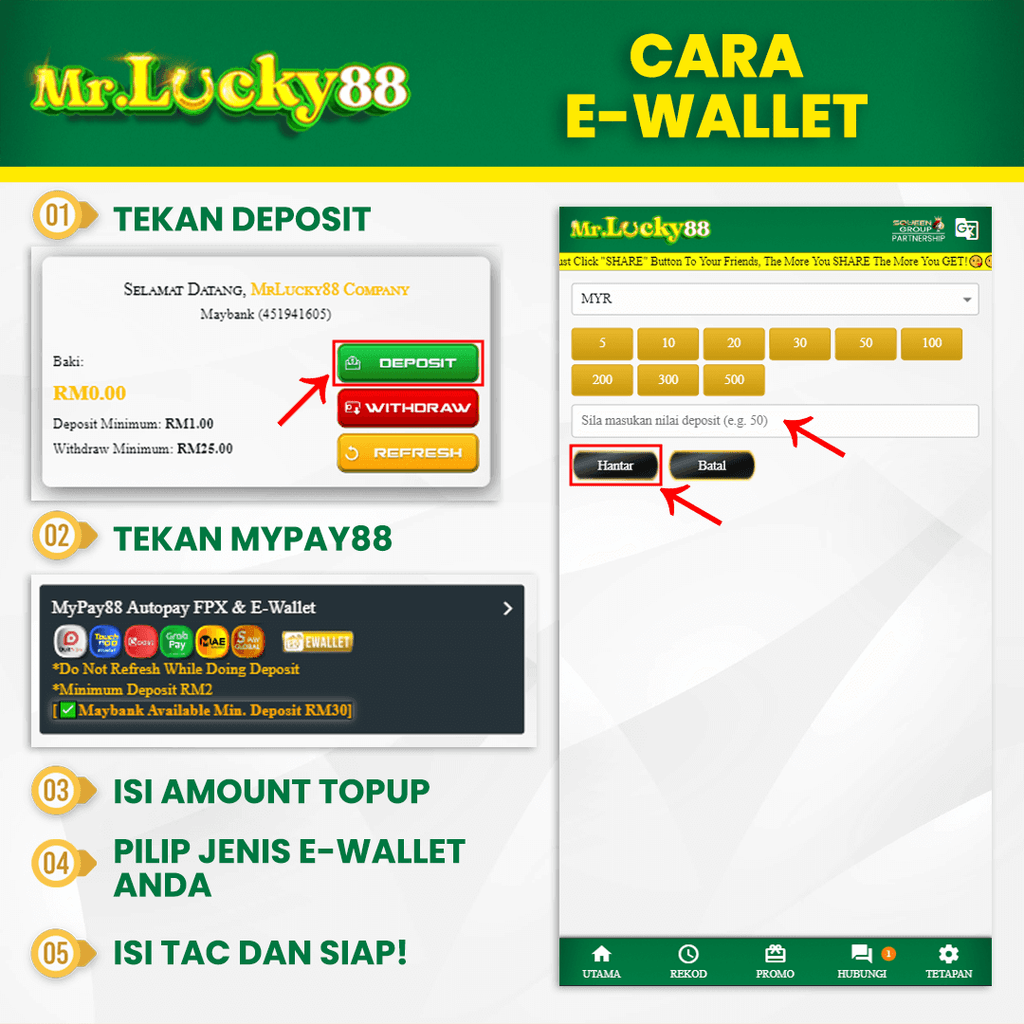
MyPay88 Deposit Limits
The minimum deposit through MyPay88 starts from RM2. However, certain providers have different requirements. Maybank, for example, has a minimum deposit of RM30 through this gateway.
Please check the applicable amount before proceeding.
During the payment process, avoid refreshing or closing the transaction page until the payment has been completed or a final status is displayed.
3. MRLUCKY88 Deposit Using Telco Reload PIN
We also support deposits through Telco Reload PIN, which uses a valid prepaid reload PIN instead of a direct online banking transaction.
To complete a Telco PIN deposit:
- Access your MRLUCKY88 account and select Deposit.
- Choose Reload PIN from the available methods.
- Select the appropriate reload gateway.
- Enter your 16-digit reload PIN.
- Submit the request and wait for the transaction result.
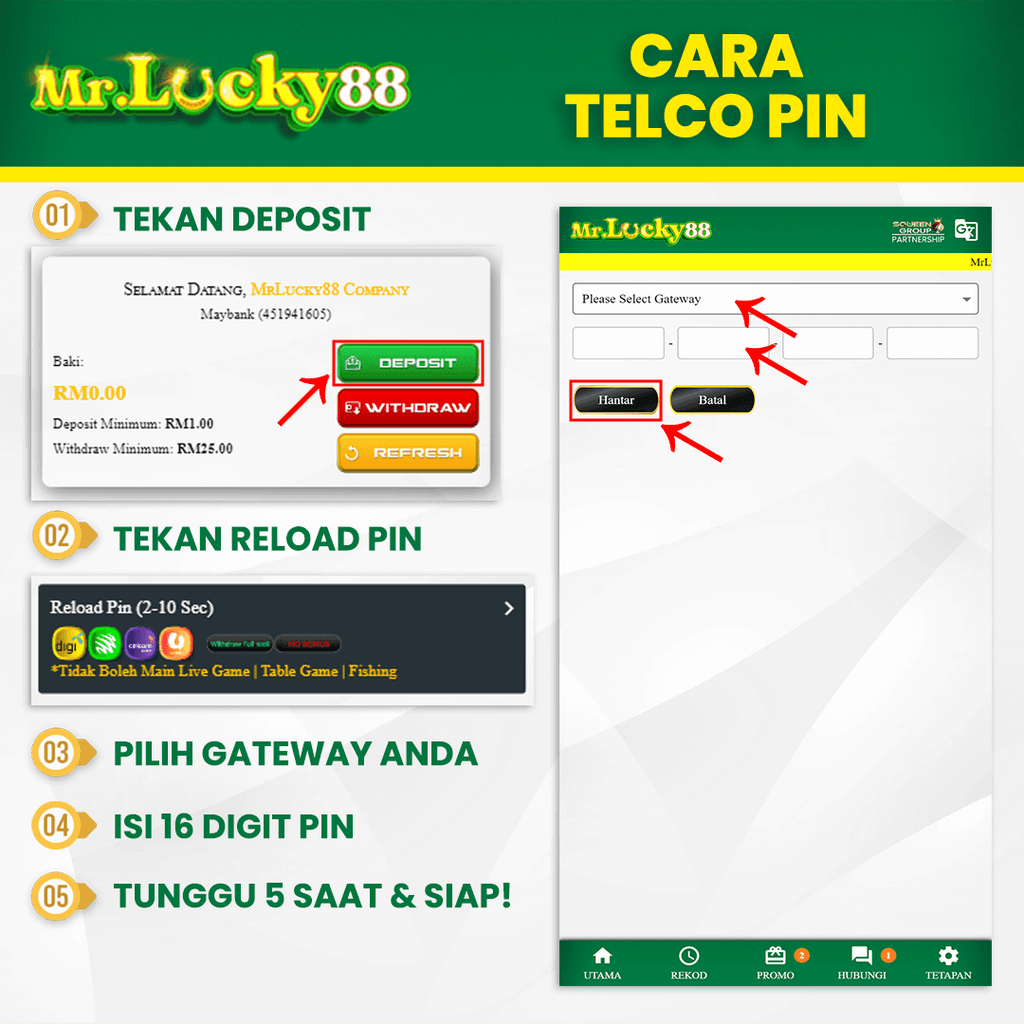
The reload instructions display an estimated processing time of approximately 2–10 seconds. Actual processing may vary.
Important Telco PIN Restrictions
Our Telco Reload PIN payment method has specific limitations:
- Live Games, Table Games and Fishing Games are not supported under this method.
- The payment instructions specify No Bonus.
- A valid 16-digit PIN is required for submission.
If you are planning to participate in a bonus campaign, check our MRLUCKY88 promotions before selecting a deposit method.
Different promotions may have their own eligible payment channels and conditions.
How to Withdraw from MRLUCKY88
Our MRLUCKY88 withdrawal process allows eligible members to request funds from their available account balance through bank withdrawal.
The minimum withdrawal amount is RM25. Before submitting a request, make sure your bank details are correct and any applicable bonus or rollover requirements have been completed.
Step-by-Step MRLUCKY88 Withdrawal Guide
Step 1: Log In and Select Withdraw
Log in to your account and select Withdraw from your dashboard.
Step 2: Check Your Withdrawal Eligibility
Before proceeding, confirm that your balance is eligible for withdrawal.
If you have an active promotion, make sure the relevant bonus or rollover requirements have been fulfilled.
Step 3: Verify Your Bank Account Details
Check the bank name, account holder name and account number displayed in the withdrawal form.
Make sure the information is correct to avoid unnecessary transaction issues.
Step 4: Enter Your Withdrawal Amount
Enter the amount you want to withdraw.
Our minimum withdrawal starts from RM25, and the requested amount must be available for withdrawal under the applicable account conditions.
Step 5: Submit Your Withdrawal Request
Review your information and click Hantar (Submit) to proceed.
Step 6: Check Your Transaction Status
Once your withdrawal request has been processed, check the transaction status and your receiving bank account.
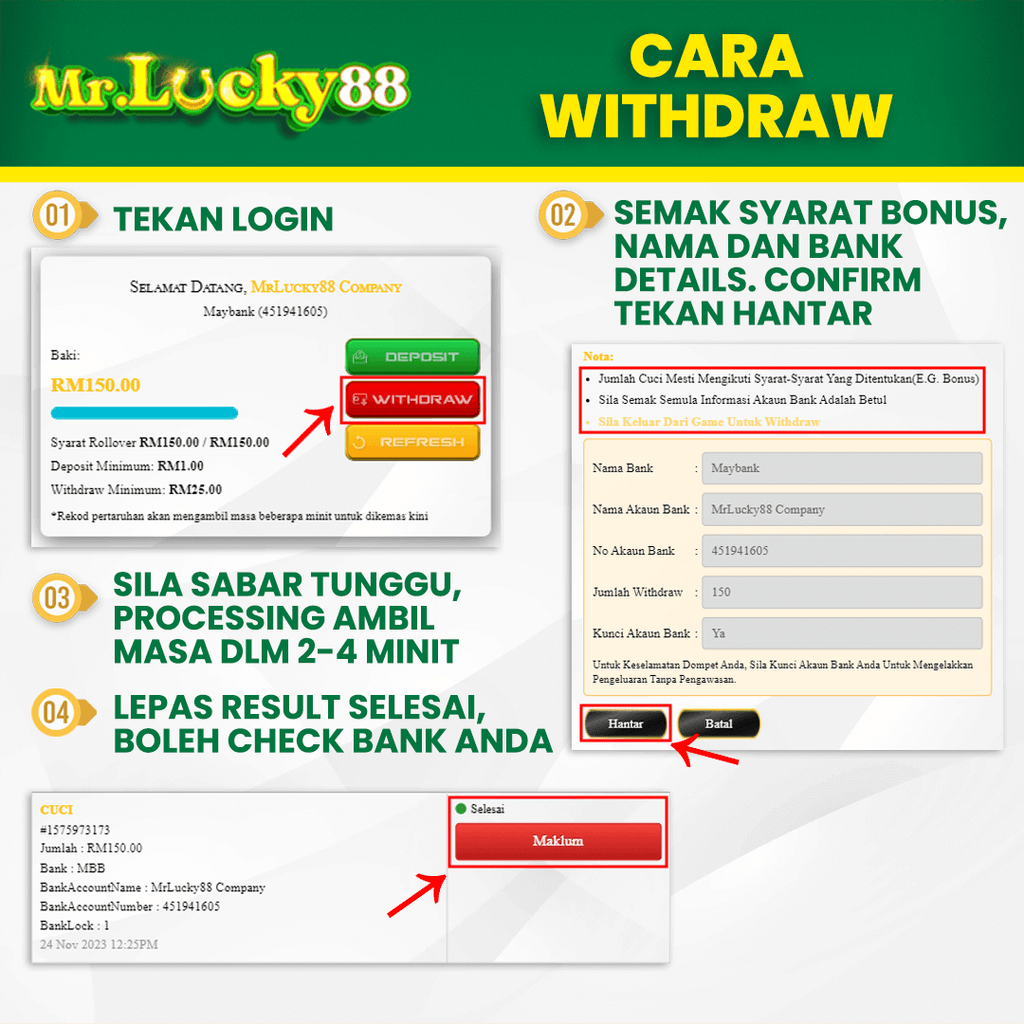
MRLUCKY88 Minimum Withdrawal and Processing Time
Our withdrawal instructions display the following information:
| Withdrawal Detail | Information |
|---|---|
| Minimum Withdrawal | RM25 |
| Withdrawal Method | Bank withdrawal |
| Estimated Processing Time | 2–4 minutes |
| Bank Information | Must be checked before submission |
| Bonus Requirements | Applicable conditions must be completed |
We aim to process eligible withdrawal requests according to the displayed transaction procedure. The estimated 2–4 minutes refers to processing and should not be treated as a guaranteed bank arrival time.
Actual completion may vary depending on payment status, verification requirements and the receiving bank.
MRLUCKY88 Deposit vs Withdrawal: Key Differences
Deposits and withdrawals serve different purposes within your account.
A deposit adds funds through one of our supported payment channels, while a withdrawal involves transferring eligible funds to your designated bank account.
| Feature | Deposit | Withdrawal |
|---|---|---|
| Purpose | Add funds to your account | Withdraw eligible funds |
| Minimum Amount | From RM1; gateway limits apply | RM25 |
| Methods | PayEssence, MyPay88, Telco PIN | Bank withdrawal |
| Verification | Depends on the payment gateway | Bank and account information |
| Bonus Conditions | Depend on the selected promotion | Outstanding requirements may affect withdrawal |
Before confirming either transaction, make sure the selected amount and account details are correct.
Common MRLUCKY88 Payment Issues and How to Resolve Them
We understand that payment questions can arise during deposits or withdrawals. If a transaction does not proceed as expected, checking a few key details can help identify the next step.
Deposit Not Reflected in Your Account
If your deposit has been completed but the balance has not updated, first check the transaction status with the selected payment provider.
Make sure the amount and payment reference match your deposit request.
For PayEssence payments, confirm that you used the newly generated QR code. For MyPay88 transactions, check whether the payment session was completed successfully.
If the funds have been deducted but your account balance remains unchanged, avoid submitting another payment immediately.
Keep your transaction reference and contact our support team for assistance.
Withdrawal Taking Longer Than Expected
Our withdrawal tutorial displays an estimated processing time of 2–4 minutes, but individual requests may take longer.
Before contacting support, check whether:
- Your withdrawal request was submitted successfully.
- Your bank account information is correct.
- Your withdrawal amount meets the RM25 minimum.
- Your applicable bonus and rollover requirements are complete.
If the request remains pending, our team can help clarify its status.
Incorrect Bank or Payment Information
Always check your payment information carefully before confirming a transaction.
For withdrawals, verify the bank name, account holder name and account number.
For Telco Reload PIN deposits, ensure the PIN is entered correctly and has not already been used.
If you encounter an issue, you can reach our MRLUCKY88 customer support through the Contact Us page.
Payment Security and Important Account Conditions
At MRLUCKY88, we encourage members to follow the payment instructions displayed in their accounts and check all transaction details before submission.
To help protect your payment information:
- Use the current payment instructions and a newly generated QR code where required.
- Avoid refreshing or closing an active payment page.
- Verify your bank details before submitting a withdrawal.
- Keep your banking passwords, OTPs and unused reload PINs private.
- Review any applicable bonus or rollover conditions before requesting funds.
Never disclose your banking password or OTP to anyone claiming to assist with a transaction.
For further information about account responsibilities, payment-related requirements and promotional conditions, please review our MRLUCKY88 terms and conditions.
What to Remember Before Your Next Transaction
At MRLUCKY88, we provide PayEssence, MyPay88 FPX & E-Wallet and Telco Reload PIN as deposit options for Malaysian members. Each method follows its own instructions and may have different payment requirements.
Our withdrawal process starts from RM25, with an advertised processing estimate of 2–4 minutes.
Whether you are depositing or withdrawing, please check your transaction details, follow the displayed instructions and ensure that all applicable account conditions are satisfied before proceeding.
Frequently Asked Questions About MRLUCKY88 Payments
What is the minimum deposit at MRLUCKY88?
Our general minimum deposit starts from RM1. However, individual payment gateways may have higher minimum amounts. MyPay88 starts from RM2, while Maybank transactions through this gateway require at least RM30.
Does MRLUCKY88 support FPX and e-wallet deposits?
Yes. We support MyPay88 Autopay FPX & E-Wallet for deposits through available online banking and e-wallet providers.
Can I deposit using Telco Reload PIN?
Yes. We offer Telco Reload PIN deposits using a valid 16-digit PIN. However, this method does not support Live Games, Table Games or Fishing Games, and its payment instructions specify No Bonus.
What is the minimum MRLUCKY88 withdrawal amount?
Our minimum withdrawal is RM25. You must also have an eligible withdrawable balance and satisfy any applicable account or promotional conditions.
How long does an MRLUCKY88 withdrawal take?
Our withdrawal instructions display an estimated processing time of 2–4 minutes. Actual completion and bank arrival times may vary depending on the transaction and receiving bank.